About
The Natural Capital Tool ('the NCT') is a free and easy-to-use, geospatial tool that aims to facilitate decision makers to take a natural capital approach to land management in Scotland. A natural capital approach is when the full range of benefits that we receive from nature are taken into consideration within the decision-making process.
The key features of the NCT are as follows: natural capital baseline mapping, ecosystem service capacity and demand mapping, habitat connectivity mapping, landscape-scale opportunity mapping, and scenario planning. Changes in ecosystem service provision are quantified through relative, biophysical and economic methods (where applicable).
Glossary
Natural capital refers to the elements of nature that hold societal value, such as habitats, ecosystems, and animal/plant species. Natural capital includes both the living and non-living aspects of ecosystems.
Ecosystem services are the benefits that natural capital provides to people, such as insect pollination, flood mitigation, and carbon sequestration.
A natural capital approach is when the full range of benefits that nature provides are considered within decision making.
Habitats are natural environments in which certain animal and plant species live. In the NCT, the habitat baseline shows the habitats present on your site (e.g., cultivated land, woodland, grassland, wetland, ponds, etc.).
Habitat networks are areas of 'usable space' that species associated with a particular habitat can move through.
Interventions refer to the specific practice you want to implement within the tool, e.g., woodland planting or grassland restoration.
Uplift refers to the change seen in ecosystem services before and after interventions.
Polygons refer to selected areas of land within the tool. Polygons can be selected from the habitat baseline map or drawn as an intervention.
FAQs
Who is the Natural Capital Tool for?
What area is covered by the NCT?
What are the newest updates to the NCT?
Can I save my progress in the NCT?
Can I export my baseline mapping and interventions?
Can I upload a geospatial file of my site to use in the NCT?
Geospatial files can be up to 5MB in size. The NCT supports upload of polygon data in one of the following formats:
- Geopackage (.gpkg)
- GeoJson (.json)
- Shapefile (.shp, .shx, .dbf, .prj)
- Mapinfo TAB (.tab, .dat, .map, .id)
If you are having difficulty uploading a file that meets these criteria, please email natcaptool@nature.scot.
How do I correctly format my area of interest polygon for upload?
If you are unsure what sort of data you are uploading, we recommend checking it first in a GIS package like QGIS. A dataset containing multiple polygons will have more than one row in the attribute table, as well as multiple polygons in the map view. Note that sometimes polygons can be drawn on top of each other, so even if the map looks like it only has a single polygon it is worth double checking the attribute table.
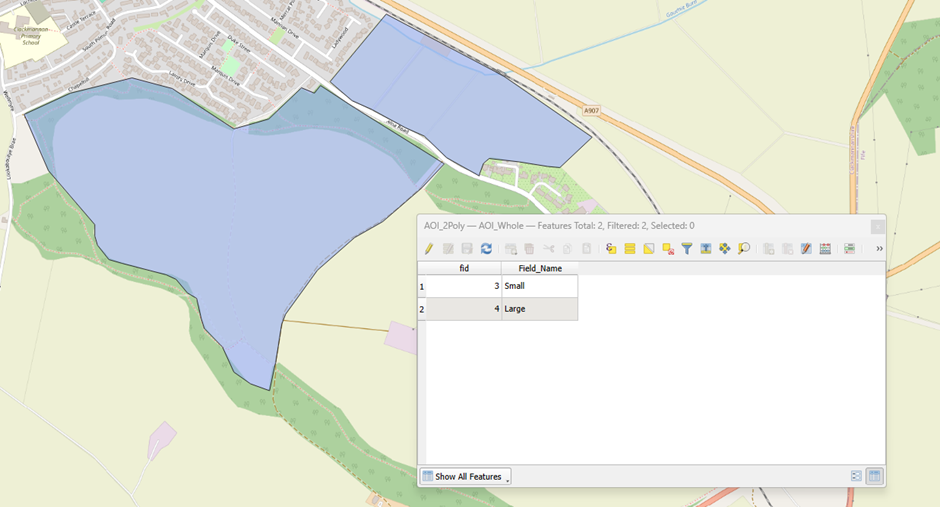 In the case of a multi-polygon you will see multiple polygons in the map view but only a single row in the attribute table.
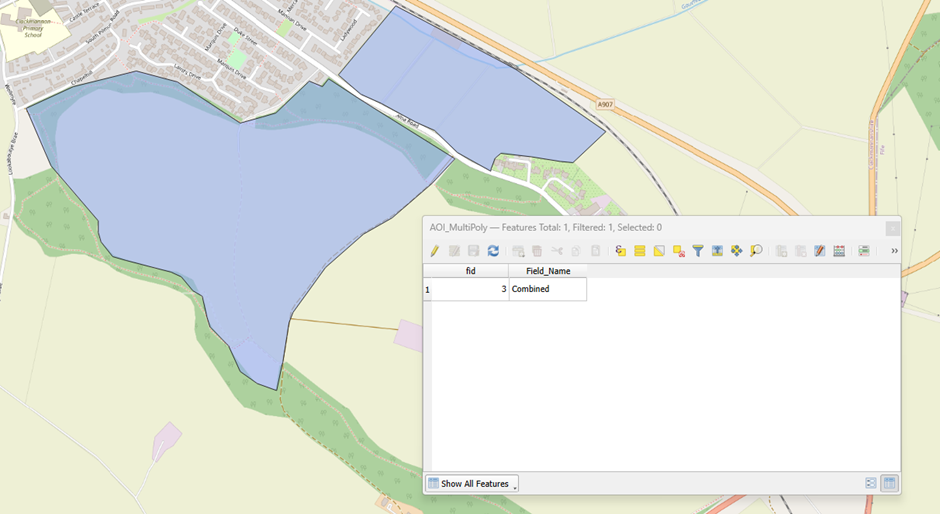 To solve this problem you need to either:
- Create a new dataset containing a single boundary that encompasses the entire area of interest, or,
- Create a new dataset for each boundary and upload these as separate scenarios. You can do this in QGIS by selecting each feature in the attribute table individually and exporting it to a new file.
Can I upload maps relevant to my project and view them in the NCT?
Files can be up to 5MB in size. The NCT supports upload of polygon data in one of the following formats:
- Geopackage (.gpkg)
- GeoJson (.json)
- Shapefile (.shp, .shx, .dbf, .prj)
- Mapinfo TAB (.tab, .dat, .map, .id)
If you are having difficulty uploading a file that meets these criteria, please email natcaptool@nature.scot.
What parameters and values are used in the ecosystem service and habitat network models?
For a complete list of geospatial data and maps used in the NCT ecosystem service models and habitat baseline, see Appendix 1 – Licensing statement in the Methodology Report.
What maps are used to create the habitat baseline?
For a complete list of geospatial data and maps used in the NCT ecosystem service models and habitat baseline, see Appendix 1 – Licensing statement in the Methodology Report.
How can I request account deletion?
If you would like to delete your Natural Capital Tool account, please email our support team at support+nct@eolasinsight.com using the email address associated with your account.
Once we receive your request, we will:
- Verify your identity to ensure the request is legitimate.
- Manually remove your account and related personal information from our systems.
- Confirm by email once the deletion has been completed.
If you have any questions about this process, our team is always happy to help.
How do we handle your data?
• Boundaries held as a geospatial object will not be attached to specific land users or landowners
• No specific boundary or personal scenarios inputted into the tool will be used to drive policy change, unless express consent is given from the user (e.g. the user is piloting the tool)
• Scenarios are not attached to any form of payment or subsidy, such as the Basic Payment Scheme or Agri-Environment Climate Scheme
If you would like to read our Privacy Notice in full, click here.